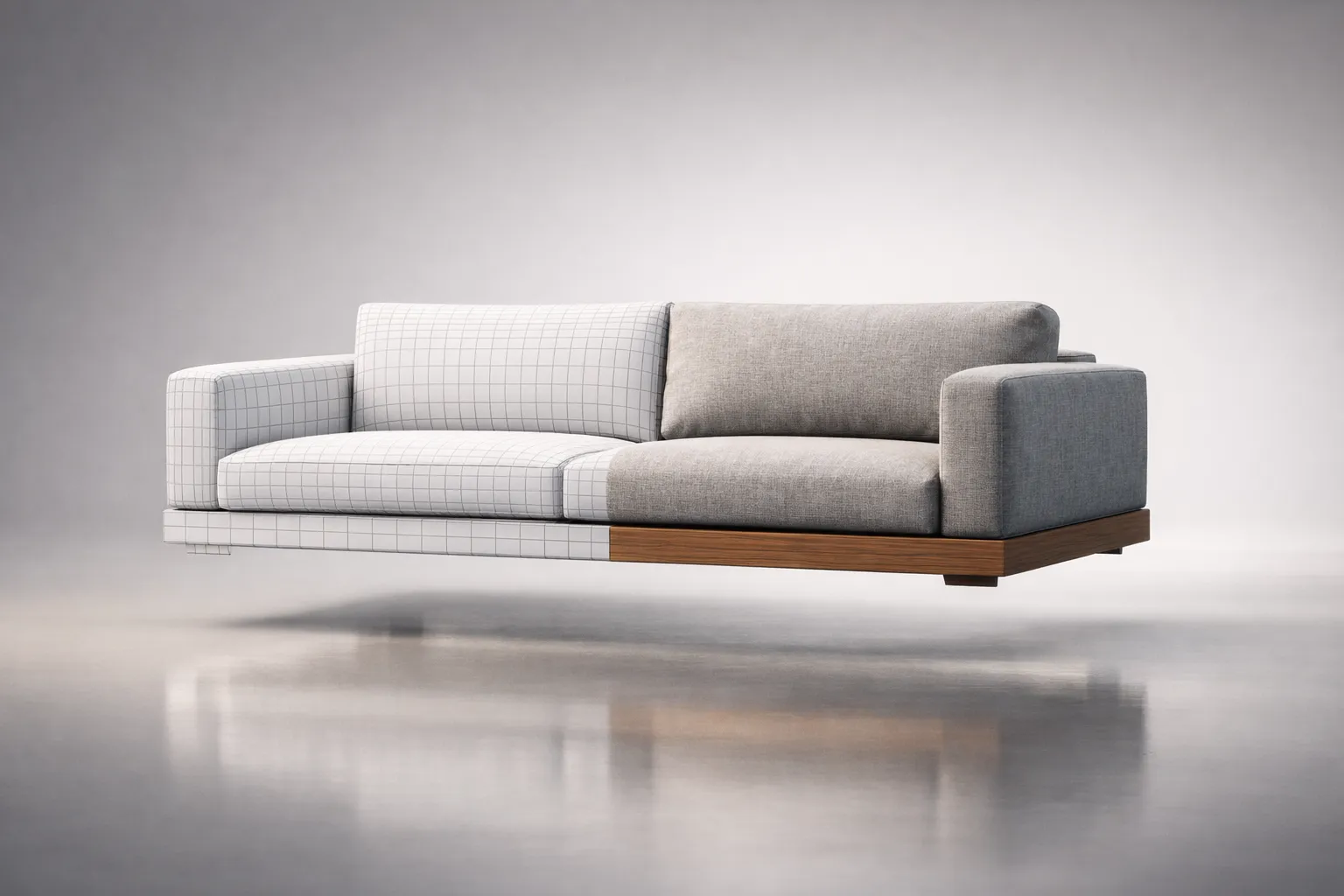
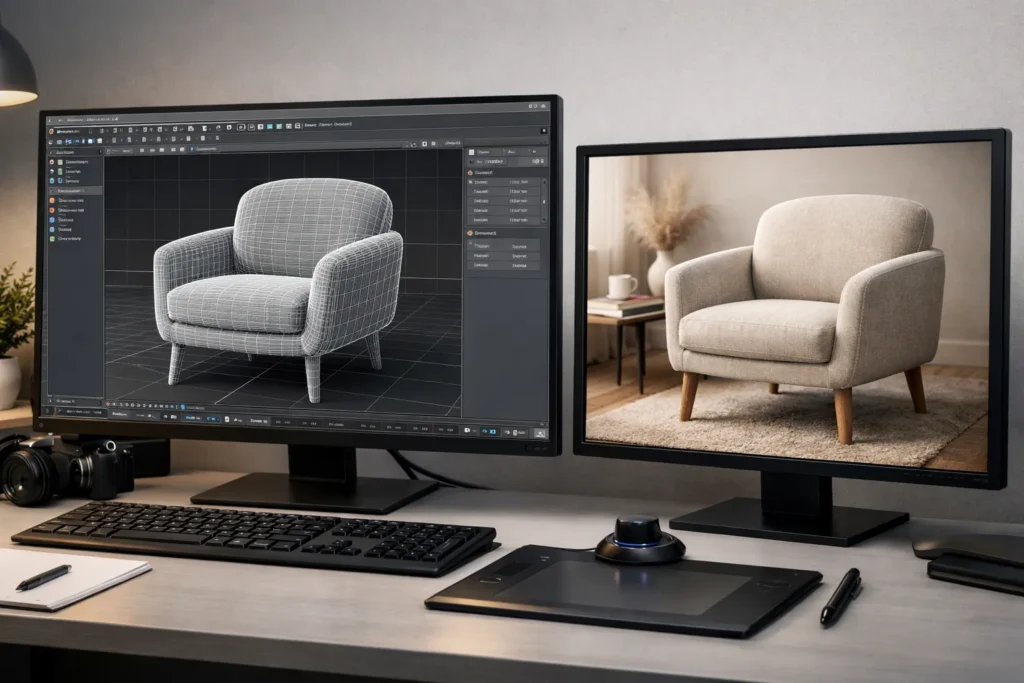
3D furniture rendering is the process of creating photorealistic digital images of furniture using computer-generated imagery (CGI) rather than a physical camera. A 3D artist builds a virtual replica of a piece of furniture – geometry, materials, lighting, environment – and the software calculates how light would behave across every surface, producing an image that can achieve photorealistic quality comparable to professional product photography when executed at a high level.
For furniture brands and retailers, this changes the economics of visual content entirely. No warehouse. No photographer. No shipping a 300-pound sectional to a studio in Brooklyn. Just a digital file that can be rendered in any color, any fabric, any room, from any angle – as many times as you need.
This guide covers how it works, what it costs, when it makes sense, and how to integrate it into your business without overcomplicating things.
What Is 3D Furniture Rendering and How Does It Work?
At its simplest, a computer builds a virtual version of your product and takes a picture of it. That picture – the render – can look like a studio photograph on a white background, a lifestyle shot in a styled living room, or a frame from a product video. The furniture doesn’t need to exist physically. It only needs to exist as data.
This is the foundation of modern 3D furniture visualization services – the ability to produce unlimited visual content from a single digital asset.
How CGI Furniture Visualization Is Created
The production pipeline has four stages, and understanding them helps you communicate with studios and manage expectations.
1. 3D Modeling An artist builds the furniture piece in three-dimensional space, working from technical drawings, CAD files, photographs, or physical measurements. Every curve, joint, stitch line, and hardware detail gets constructed as geometry. For high-resolution offline rendering, a mid-complexity dining chair may involve tens of thousands of polygons, while a detailed tufted sofa can reach several million, depending on the modeling approach.
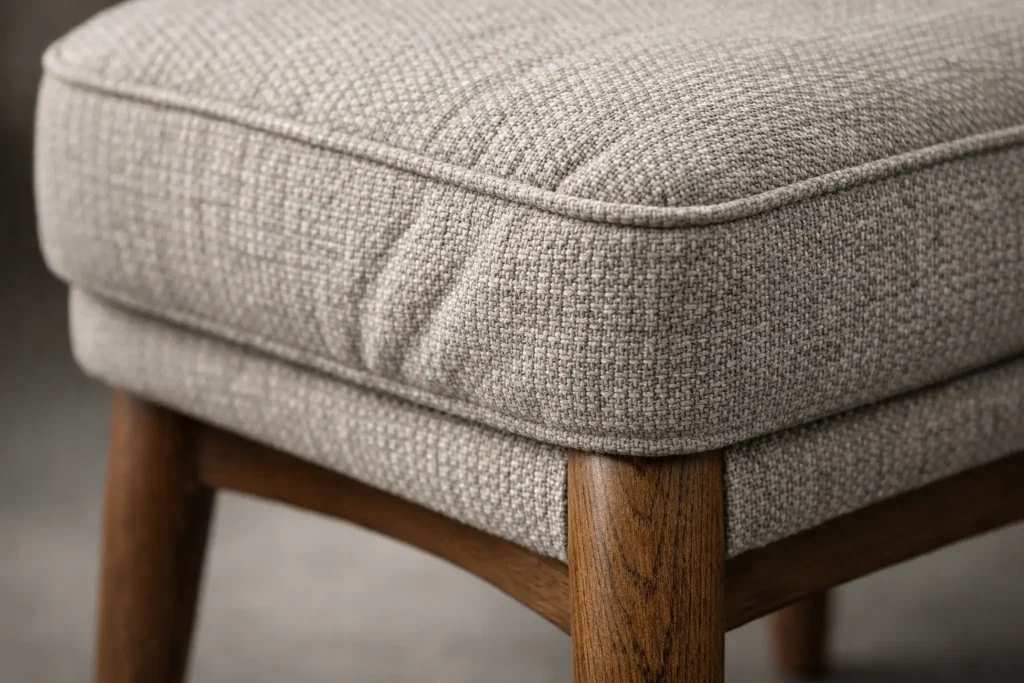
2. Texturing Raw geometry looks like a gray clay model. Texturing adds surface identity – the grain pattern of walnut, the weave of linen upholstery, the brushed finish on a brass leg. Modern texturing uses PBR (physically based rendering) materials, which define not just color but how a surface reflects, absorbs, and scatters light. This is what makes the difference between “that looks like a computer image” and “wait, that’s not a photo?”
3. Lighting The scene gets lit – either to simulate a photography studio (soft boxes, rim lights, controlled shadows) or a natural environment (sunlight through a window, ambient bounce from walls and ceiling). Lighting is arguably the single most important factor in whether a render looks convincing. Bad lighting exposes every shortcoming. Good lighting makes even simple geometry sing.
4. Rendering The software calculates the final image, tracing how millions of light rays interact with every surface in the scene. Depending on complexity and resolution, a single frame can take anywhere from a few minutes to several hours to compute. The output is a high-resolution image file ready for use.
3D Modeling, Texturing, Lighting, and Rendering Explained
Think of it as an assembly line. Modeling builds the skeleton. Texturing adds the skin. Lighting sets the mood. Rendering takes the photograph. Skip or rush any step, and the final image suffers.
The quality gap between studios almost always traces back to one of these four stages. A company that nails the modeling but rushes the texturing produces furniture that looks dimensionally correct but materially wrong – like a sofa wrapped in a flat image instead of actual fabric. A studio with beautiful materials but careless lighting produces renders that feel artificial despite having all the right details.
Difference Between 3D Furniture Rendering and Product Photography
Product Photography
3D Rendering
Requires physical product
Yes
No
Cost per additional colorway
Full reshoot
Minutes of artist time
Environment flexibility
Limited to available sets
Unlimited – any room, any style
Consistency across catalog
Difficult at scale
Pixel-perfect consistency
Turnaround for new SKU
Days to weeks (logistics + shoot)
Days (digital only)
Upfront cost per image (indicative mid-market ranges, varies by region and complexity)
$200–$800
$150–$600
Cost at scale (100+ SKUs)
Adds up fast
Drops significantly per unit
Photography still has advantages – particularly for marketing content where authentic texture and “realness” matter to the brand story. But for catalog-scale product imagery, the math increasingly favors CGI. A furniture rendering services provider can produce your entire catalog from digital files without moving a single piece of physical inventory.
Why Is 3D Furniture Rendering Important for Furniture Retailers and Brands?
Three forces are pushing the industry toward CGI, and none of them is slowing down.
Product proliferation. Customers expect to see every configuration – every fabric, every finish, every leg option – before they buy. A sofa available in 40 fabrics and 3 leg styles is 120 SKUs. Photographing all of them can be prohibitively expensive at scale. Rendering them is routine.
Speed to market. In a competitive landscape, the brand that gets product imagery live first captures early demand. 3D visualization for furniture retailers compresses the content timeline from weeks (waiting for prototypes, scheduling shoots, post-processing) to days.
Channel multiplication. You need images for your website, Amazon, Wayfair, social media, print catalogs, trade show displays, and AR apps – each with different specs, aspect ratios, and styling requirements. A single 3D model can generate all of them. A single photo shoot cannot.
How Does 3D Furniture Rendering Improve E-Commerce Performance?
Industry data suggests a strong correlation between richer product visuals and improved conversion rates.
Specifically, furniture product visualization through CGI enables:
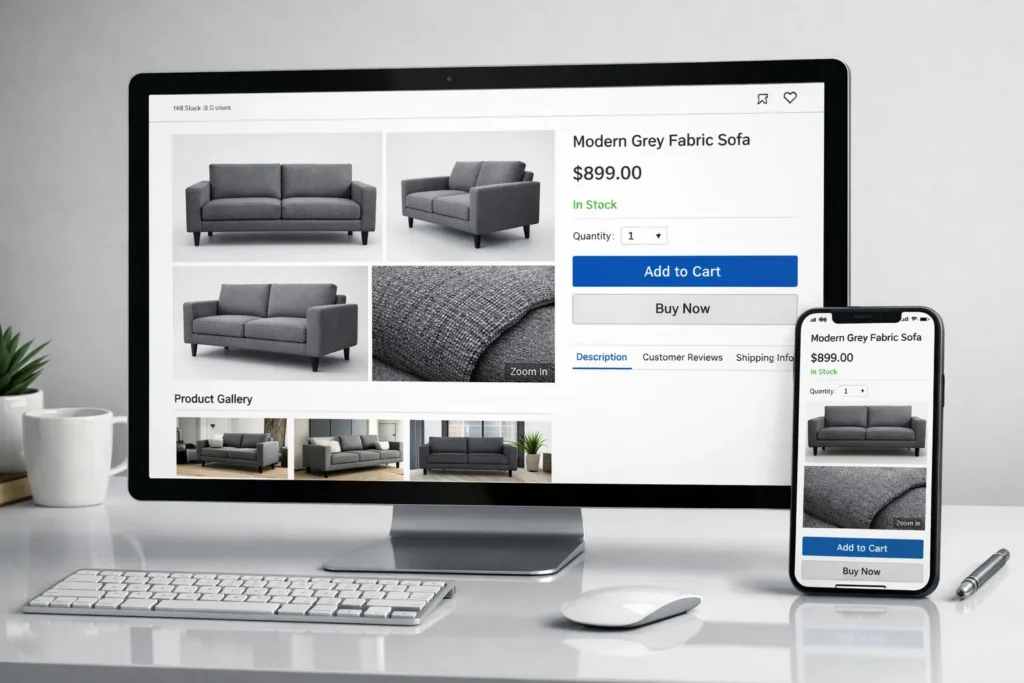
More images per product page without proportional cost increase. Five angles instead of two. Lifestyle context shots. Detail close-ups. Each additional image reduces buyer uncertainty.
Consistent visual quality across the entire catalog. No variation in lighting, color accuracy, or styling between products shot on different days or in different studios.
Faster listing of new products. You can have rendered imagery ready before the first production unit ships – critical for pre-order campaigns and seasonal launches.
Lower return rates. When customers see exactly what they’re getting – accurate color, accurate scale, accurate material texture – they’re less likely to be disappointed. Several large e-commerce retailers have reported that improving product imagery and visual clarity can contribute to lower return rates in furniture categories.
Types of 3D Furniture Rendering Services
Not all renders serve the same purpose. Here’s what’s available and when each type earns its place.
Photorealistic Furniture Rendering
The flagship. A photorealistic 3D furniture image that’s virtually indistinguishable from a studio photograph. Used for hero images on product pages, print advertising, and any context where visual credibility is paramount.
This is where material accuracy matters most. The grain of the wood, the nap of the velvet, the way light catches a beveled edge – every detail has to hold up at full resolution. Studios specializing in 3d rendering of luxury furniture spend significant time on material development alone, often building custom shader libraries for specific wood species, stone types, and textile weaves.
Lifestyle and Interior Scene Rendering
The product is placed in a styled room – a sectional in a sunlit loft, a dining table set for dinner, a bed dressed with linens in a serene bedroom. These images sell aspiration, not just product. They answer the question every furniture buyer asks: “What will this look like in a real space?”
Kitchen furniture visualization is a particularly strong use case here. Cabinetry, islands, and built-in storage are almost impossible to evaluate outside of a room context. A lifestyle render showing the full kitchen – countertops, backsplash, appliances, lighting – gives the buyer a complete picture that a white-background product shot never could.
White Background Product Rendering
Clean, isolated, no distractions. This is the standard for e-commerce marketplaces (Amazon, Wayfair, Target) and product catalogs. White background renders need to be dimensionally accurate, consistently lit, and color-matched to the physical product.
Simple? Yes. Easy to do well? Not as much as people think. Inconsistent shadow direction, slightly off color temperature, or visible geometry artifacts are immediately obvious against a pure white field.
360° Product Rendering and Configurators
Instead of a single image, the product is rendered from every angle – typically 36 or 72 frames around a turntable – and assembled into an interactive viewer. The customer drags to rotate, seeing the piece from any perspective.
Product configurators take this further: the viewer can swap fabrics, change finishes, adjust dimensions, and see the result update in real time. This is where 3D furniture design solutions intersect directly with e-commerce technology. The 3D model becomes not just a visual asset but a functional sales tool.
IKEA’s configurator for kitchen and storage systems is the most visible example, but the technology is now accessible to mid-market brands through platforms like Threekit, Cylindo, and Zakeke.
Augmented Reality (AR) Furniture Visualization
AR lets the customer point their phone at their living room and see a virtual sofa sitting on their actual floor, at actual scale. Apple’s ARKit and Google’s ARCore have made this mainstream – Shopify, for instance, supports AR product views natively.
The 3D model used for rendering is typically the same asset (or a lightweight derivative) used for AR. This is one of the strongest arguments for investing in high-quality 3D furniture modeling services – a single well-built model feeds your product page, your configurator, and your AR experience.
Virtual Staging for Furniture Brands
Virtual staging places furniture into photographs of empty rooms – real rooms, not CGI environments. It’s widely used in real estate, but furniture brands are adopting it to show their products in authentic residential settings without the cost of physical staging.
A brand can take photos of ten different room styles and digitally place any product from their catalog into any of them. The result looks like a professional interior shoot at a fraction of the cost.
What Is the Difference Between 3D Furniture Rendering and 3D Furniture Modeling?
People use these interchangeably. They’re not the same thing.
3D modeling is building the digital object – the geometry, the shape, the structure. It’s the equivalent of constructing the physical piece in a virtual workshop. A 3D furniture modeling company delivers a digital file (typically .OBJ, .FBX, or .MAX) that accurately represents the product’s form.
3D rendering is taking a picture of that digital object – setting up lighting, materials, camera angle, and environment, then computing the final image.
Modeling is a prerequisite for rendering, but a model without a render is just data. A render without a good model is a pretty picture of something inaccurate.
Why does the distinction matter? Because you might need models for purposes beyond rendering – AR applications, product configurators, manufacturing visualization, or game engines. If you commission custom 3D furniture modeling services, make sure the models are built to a standard that supports all your intended uses, not just the immediate rendering project.
How Is 3D Furniture Rendering Used in Marketing and Advertising?
CGI Furniture Rendering for Social Media Campaigns
Social media demands volume. You need fresh visuals constantly – seasonal themes, new colorways, styled vignettes, promotional graphics. CGI furniture production scales to meet that demand in ways photography simply can’t.
A single 3D model of a sofa can be rendered in a spring palette for March, a warm-toned living room for October, and a holiday-styled scene for December – without moving anything physical. Brands like Article and Burrow have leaned heavily into CGI-driven social content precisely because of this flexibility.
Instagram and Pinterest are visual-first platforms where lifestyle context drives engagement. A beautifully rendered room scene with your product as the centerpiece performs the same function as a styled photo shoot – often better, because you control every variable.
Using 3D Renders in Print Catalogs and Lookbooks
Print isn’t dead in furniture. Restoration Hardware’s Source Books, IKEA’s catalog (before they discontinued it), West Elm’s seasonal lookbooks – these remain powerful brand tools. And increasingly, the imagery in them is partially or fully CGI.
The advantage of print is consistency. When you’re laying out 200 pages of product imagery, matching lighting, color temperature, and styling across every shot is a nightmare with photography. With rendering, it’s a parameter you set once.
3D Furniture Animation and Product Videos
Animation extends the static render into motion. A camera orbiting a dining table. A time-lapse of a modular shelving system being configured. An exploded view showing the internal construction of an upholstered chair.
Product videos are increasingly important for e-commerce (Amazon now supports video on product listings) and social media. A 15-second animation of a chair rotating against a clean background is simple to produce from an existing 3D model and performs well as a social ad or product page enhancement.
Trade Show and Digital Display Applications
At trade shows like High Point Market or Salone del Mobile, screen real estate matters. Large-format displays running rendered imagery or animation draw attention and communicate product range without requiring every SKU to be physically present.
Some brands now show their full collection digitally – physical samples of hero pieces, with the rest of the line presented through high-quality renders on screens and tablets. It reduces shipping costs, booth size requirements, and setup complexity.
High-End Furniture Branding Through CGI
For luxury and designer furniture brands, visual quality is brand equity. Every image communicates craftsmanship, material quality, and design intent. 3D rendering services for products at this level require artists who understand not just software but design language – how light interacts with hand-finished surfaces, how a piece sits in an architecturally significant space, how to convey the weight and presence of a solid walnut credenza through pixels.
The best 3D furniture rendering services studios working in the luxury segment function more like creative agencies than production houses. They art-direct scenes, develop custom environments, and treat each render as a piece of brand communication.
How Much Does 3D Furniture Rendering Cost?
Average Pricing for 3D Furniture Rendering Services
Pricing varies significantly by complexity, quality level, and studio location. Here’s what the market looks like in 2025–2026:
Deliverable
Price Range
3D model (single furniture piece)
$150–$800
White background render (per angle)
$75–$300
Lifestyle/interior scene render
$300–$1,500
360° spin (36 frames)
$400–$1,200
Product animation (15–30 sec)
$1,000–$5,000
AR-ready model
$300–$1,000
Full catalog package (50+ SKUs)
Custom quote – significant volume discounts
These are mid-to-high-end rates. Budget studios exist at lower price points, but in furniture – where material accuracy and lighting quality directly affect purchase decisions – cutting corners on rendering quality is a false economy.
Factors Affecting the Cost of CGI Furniture Visualization
Geometric complexity. A simple side table with clean lines takes far less modeling time than a tufted Chesterfield sofa with rolled arms, nail-head trim, and turned legs. Upholstered pieces with visible stitching and fabric texture are consistently the most labor-intensive.
Material variety. If the product comes in 5 finishes, that’s 5 material setups. If it comes in 40 fabrics, that’s 40. Most studios offer per-variant pricing that drops significantly after the base model and first material are complete.
Scene complexity. A product on white costs less than a product in a fully styled room with custom architecture, props, and environmental lighting.
Resolution and intended use. Web-resolution renders (2000–3000px) cost less than print-resolution (6000px+) or billboard-scale output.
Revision rounds. Most studios include 2–3 rounds. Scope creep in revisions is the most common source of budget overruns.
Cost Comparison: 3D Rendering vs Traditional Photography
For a single hero product in one configuration, photography and rendering cost roughly the same; sometimes photography is cheaper if you already have the product and a studio relationship.
The math flips at scale. Consider a furniture brand with 200 SKUs, each available in an average of 8 fabric/finish options:
Photography: 1,600 individual shoots. Even at $300 per shot (low for styled furniture photography), that’s $480,000 – plus logistics, shipping, warehousing, and scheduling.
Rendering: 200 base models ($400 avg = $80,000) + 1,400 material variants ($80 avg = $112,000) = $192,000. And you keep the models for future use.
The gap widens further when you factor in speed. A photography campaign of that scale takes months. A rendering pipeline can deliver it in weeks.
Budget Optimization Tips for Furniture Brands
Start with your best sellers. Don’t render the entire catalog on day one. Begin with the 20–30 products that drive the most revenue, prove the ROI, then expand.
Invest in models, economize on scenes. A well-built 3D model is a long-term asset. Spend appropriately on modeling quality. For scenes, reuse and adapt environments across multiple products rather than building custom rooms for every shot.
Bundle projects. Studios offer meaningful volume discounts. A 50-SKU project will cost significantly less per unit than 50 individual commissions.
Provide complete reference material. Fabric swatches, finish samples, dimensioned drawings, and existing photography (even phone photos) all reduce the studio’s guesswork and revision cycles. Incomplete briefs are the number one driver of unexpected costs.
How Long Does It Take to Create 3D Furniture Renderings?
Deliverable
Typical Timeline
Single product model
2–5 days
White background renders (3–5 angles)
1–2 days after model approval
Lifestyle scene render
3–7 days after model approval
Material/fabric variants
1–2 days per batch of 5–10
360° spin
2–3 days after model approval
Product animation (15–30 sec)
5–10 days
Full catalog project (50+ SKUs)
4–10 weeks
The bottleneck is rarely rendering time – modern render farms handle that efficiently. It’s modeling complex geometry, developing accurate materials, and waiting for client feedback.
Two things accelerate every project: clean reference materials upfront and consolidated feedback per review round. Studios that receive a complete tech pack (dimensions, material specs, construction details, reference photos from multiple angles) can start modeling immediately. Studios that receive “here’s our website link, figure it out” spend days just gathering information.
What Software Is Used for 3D Furniture Rendering?
3ds Max and V-Ray for Photorealistic Furniture Rendering
One of the most widely used combinations in the furniture visualization industry. Autodesk 3ds Max provides robust modeling and scene management tools; Chaos V-Ray delivers physically accurate rendering with extensive material libraries. The vast majority of high-end furniture 3D rendering studios run this pipeline.
V-Ray’s material system is particularly well-suited to furniture – its ability to accurately simulate fabric weave, wood grain, and material response makes it one of the most widely used rendering engines in production environments. The trade-off is that it’s offline rendering: you set up the scene, hit render, and wait.
Blender for CGI Furniture Projects
Blender has matured into a legitimate production tool. Its Cycles renderer produces photorealistic output, and its modeling toolset is comprehensive. A growing number of studios – particularly smaller firms and freelancers – use Blender for 3D furniture design and rendering work.
The cost advantage is real: Blender is free and open-source. For brands working with independent artists or building in-house capability, it eliminates software licensing as a barrier. The ecosystem of furniture-specific assets and plugins is smaller than 3ds Max’s, but the community is active, and the gap is closing.
Unreal Engine for Real-Time Furniture Visualization
Unreal Engine 5 enables high-quality real-time rendering that, in many interactive scenarios, approaches photorealistic standards. For furniture brands, this opens up interactive product configurators, AR experiences, and virtual showrooms that respond instantly to user input.
The visual quality of Unreal’s Lumen global illumination and Nanite geometry system has reached a point where real-time output can approach offline rendering quality for many interactive use cases, particularly in web and configurator environments.
KeyShot and Corona Renderer for Product Rendering
KeyShot is popular for its simplicity – drag-and-drop materials, straightforward lighting, and fast results. It’s a strong choice for internal design teams that need quick visualizations without deep 3D expertise.
Corona Renderer (also by Chaos, the makers of V-Ray) offers a slightly different rendering approach that some artists prefer for its ease of use and the quality of its light simulation. It’s widely used in architectural and furniture visualization, often as an alternative to V-Ray within the same 3ds Max environment.
What Makes High-Quality 3D Furniture Rendering?
You can evaluate quality quickly if you know what to look for:
Material accuracy. Does the oak look like oak – not just in color but in grain depth, surface sheen, and how it catches light at different angles? Does the fabric have visible weave structure, or does it look like a flat image wrapped around a shape? Material work is where most quality differences live.
Lighting that behaves naturally. Soft shadows with appropriate falloff. Color temperature that matches the intended environment. No blown-out highlights or unnaturally dark shadows. The light should feel like it belongs in the scene, not like it was placed arbitrarily.
Geometric precision. Proportions, edge profiles, and construction details should match the real product exactly. A cushion that’s too firm-looking, a leg that’s slightly too thin, or a seam that’s in the wrong place – these details register subconsciously even when viewers can’t articulate what’s wrong.
Convincing soft goods. Upholstered furniture is the hardest category to render well. Cushions need to look like they have weight and give. Fabric needs to drape naturally. Pillows need to look casually placed, not rigidly positioned. Studios that excel at soft goods rendering are worth a premium.
Scene dressing that feels real. In lifestyle renders, the surrounding environment matters as much as the product. A styled coffee table with books, a candle, and a small plant. A throw blanket draped over an armrest. These details create the sense that someone actually lives in the space.
When evaluating a 3D visualization for a furniture studio, ask to see close-up crops of their work, not just wide shots. Quality reveals itself in the details.
How Can Furniture Brands Integrate 3D Rendering Into Their Workflow?
This is where most brands stumble. They commission a batch of renders, use them, and then start from scratch for the next project. The real value comes from building a system.
Building a Digital Furniture Asset Library
Every 3D model you commission is a reusable asset. Treat it that way. Maintain an organized library of models with consistent naming conventions, file formats, and quality standards. When you launch a new fabric collection, you don’t need new models – you apply new materials to existing ones.
Over time, this library becomes one of your most valuable marketing assets. A brand with 500 production-ready 3D models can generate a highly scalable and flexible range of visual content on demand.
Creating 3D Models for Omnichannel Marketing
A single well-built model serves your website (rendered product images), your social media (lifestyle scenes), your print catalog (high-resolution output), your AR app (optimized mesh), and your trade show displays (animation or real-time visualization).
The key is commissioning models at the right quality level from the start. A model built only for web-resolution rendering may not hold up in print or AR. Discuss intended uses with your 3D furniture visualization provider before production begins.
Using 3D Rendering for Product Configurators
Configurators – where customers select fabric, finish, size, and features and see the product update visually – are becoming table stakes for furniture e-commerce. They require 3D models built with configurability in mind: modular geometry, swappable material slots, and optimized file sizes for real-time display.
If you’re planning a configurator, involve your rendering partner early. Retrofitting models for configurator use is more expensive than building them correctly from the start.
Integrating CGI With ERP and E-Commerce Platforms
The most sophisticated furniture brands connect their 3D asset pipeline directly to their product information management (PIM) and e-commerce systems. When a new SKU is created in the ERP, it triggers a rendering request. When renders are approved, they’re automatically pushed to the correct product listings across all channels.
This level of integration requires planning and investment, but it eliminates the manual bottleneck of managing visual assets across platforms – a bottleneck that gets painful fast as SKU counts grow.
When Should Furniture Retailers Choose 3D Rendering Over Photography?
Choose rendering when:
You have a large catalog with many materials and configuration variants
Products are in development, and physical samples aren’t available yet
You need consistent visual quality across hundreds or thousands of SKUs
You want to support AR, configurators, or interactive experiences
You’re launching in multiple markets and need localized lifestyle imagery (different room styles for different regions)
Speed matters – you need imagery faster than physical logistics allow
Stick with photography when:
You have a small, curated collection (under 20 SKUs) with minimal variants
Authenticity and craft storytelling are central to your brand – handmade details, artisan processes, workshop imagery
You need behind-the-scenes or process content that CGI can’t replicate
Your budget is very limited, and you only need a handful of images
Use both when:
You want photography for brand storytelling and hero content, and CGI for catalog-scale product imagery and interactive tools
You’re transitioning from photography to rendering and want to phase in gradually
Most mid-to-large furniture brands end up in the “use both” category. The question isn’t whether to adopt rendering – it’s how quickly to scale it and where to draw the line between CGI and camera.
A furniture visualization for website strategy that combines rendered product images with photographed brand content often delivers the best balance of efficiency and authenticity.
If you’re running a furniture brand or retail operation and your visual content pipeline is still built entirely around photo shoots – or if you’re producing CGI but not getting the quality or efficiency you need – it’s worth a conversation.
Our studio provides end-to-end 3D visualization for furniture brands: from initial modeling through final rendered imagery, animation, AR assets, and configurator-ready files. We work with retailers, manufacturers, and DTC brands to build visual content systems that scale with their catalogs – not against them.
Reach out and let’s talk about what your product line needs.
FAQ
Neither is categorically better. Rendering excels at scale, speed, consistency, and flexibility – particularly for large catalogs with many variants. Photography excels at authenticity, tactile storytelling, and situations where the physical product is the message. For most furniture brands above a certain size, rendering handles the bulk of product imagery while photography serves brand and editorial content.
Yes. Rendered images meet the technical requirements of all major e-commerce platforms – Amazon, Shopify, Wayfair, Overstock, Target, and others. White background renders conform to marketplace image standards. Lifestyle renders work for enhanced brand content (Amazon A+ Content, Shopify product pages). Many top-selling furniture listings on these platforms already use CGI – you just can't tell.
At minimum: overall dimensions and clear photographs of the product from multiple angles. For accurate 3D modeling, width, depth, height, and a comprehensive set of reference images are typically sufficient. The more angles and close-up details provided, the more precisely geometry, proportions, and surface transitions can be reconstructed.
Physical samples or high-resolution scans help refine texture scale, reflectivity, and surface behavior under light. Reference imagery that defines the intended visual style also supports alignment in mood, camera language, and presentation context.
A structured and detailed brief reduces assumptions, shortens revision cycles, and ensures the final result matches both technical expectations and visual intent.
Absolutely. The 3D model created for rendering is the same foundational asset used for AR experiences and product configurators. It may need optimization (polygon reduction, texture compression) for real-time applications, but the geometry and material data carry over. This is one of the strongest arguments for investing in quality 3D furniture modeling – a single well-built model feeds multiple customer-facing applications.
Yes. Any fabric, leather, wood finish, metal treatment, or surface material can be accurately represented in a render. Studios work from physical samples, high-resolution scans, or manufacturer-provided digital texture files to build materials that match the real product. For brands offering extensive customization – dozens of fabrics, multiple wood stains, various hardware options – this is where rendering's efficiency advantage over photography becomes most dramatic.
Standard deliverables include JPEG and PNG files at web-optimized resolution, often around 4000px on the longest edge for digital use. PNGs with a transparent background are commonly used for white-background product imagery or layered marketing layouts.
For print applications, studios usually prepare higher-resolution files starting from approximately 8000px at 300 DPI, depending on the intended paper size and layout format. Large-scale posters, brochures, or exhibition graphics may require even greater pixel density to ensure sharp reproduction at full scale.
For AR experiences and online configurators, optimized 3D assets are delivered in formats such as GLB, USDZ for Apple AR environments, or FBX, depending on the integration pipeline. File size, texture compression, and polygon count are calibrated to match platform performance requirements.
All output specifications should be defined before production begins. Planning resolution, aspect ratio, color profile, and file format in advance ensures technical consistency and avoids costly adjustments after rendering is complete.
Evidence suggests yes. When customers see accurate, detailed visual representations of a product – correct color, correct scale, correct material texture, shown from multiple angles and in context – the gap between expectation and reality narrows. Industry case studies suggest that improving product visualization can contribute to measurable reductions in return rates in furniture categories. For furniture, where returns are logistically expensive (shipping a sofa back costs real money), even a modest reduction in return rate delivers significant savings.
Rate article:
Nice
Average rating: 0 / 5
Vote count: 0
Denys Borozenets
CEO at GENENSE
Denys is the CEO of GENENSE Studio. His mission is to build an international community of passionate CGI professionals, where everyone can unlock their potential by creating high-end digital content that helps highlight any product on the global stage.
As a leader, he holds himself to the highest standard of responsibility - for both his own work and that of his team. For the members of GENENSE, responsiveness and open communication are the core values that drive their collective success.
3D product animation is the process of creating a computer-generated video that shows an item in motion – rotating, assembling, disassembling, functioning, or existing within a styled environment – using three-dimensional digital models rather than a physical camera. The product doesn’t need to exist. The environment doesn’t need to be built. Everything happens inside software, […]
3D interior rendering is a digital image of a room that doesn’t exist yet. It looks like a professional photograph – accurate lighting, real materials, actual furniture models – but the space hasn’t been built. Or it’s about to be gutted and redesigned. A 3D artist takes your floor plans, material picks, and design direction, […]
3D exterior rendering is the creation of photorealistic digital images that show what a building will look like from the outside – its facade, landscaping, surrounding streets, sky, and atmosphere – all before a single brick is laid. If you’ve ever seen a gorgeous image of a proposed development on a real estate website and […]
A 3D walkthrough animation is a computer-generated visual simulation that allows viewers to virtually navigate a three-dimensional space as if physically moving within it. Created using specialized 3D modeling and rendering software, it presents a continuous sequence of frames that replicates the experience of moving through an architectural structure, landscape, or other designed space — […]
Why corporate headquarters need visualization that goes beyond “nice pictures.” Corporate headquarters are not just workplaces – they are strategic assets. Executive floors host investor briefings, R&D labs sit next to agile neighborhoods, and client areas must perform as brand touchpoints while meeting stringent acoustic, security, and wellness criteria. In this setting, office interior rendering […]
Why visualization makes or breaks a sports pitch Securing buy‑in for an arena, training complex, or campus rec upgrade demands more than attractive images. Decision‑makers need to understand how a building will move crowds, manage light and sound, and deliver revenue across game day and non‑event operations. This is where rigorous visualization turns vision into […]